Workflow guide
Save Rightmove properties to Google Sheets.
RentHuddle gives a rental group a consistent way to capture a Rightmove listing, check the details and add it to the same comparison Sheet.
How the workflow works
- Open a supported Rightmove property page in Google Chrome.
- Open RentHuddle and select Capture Property.
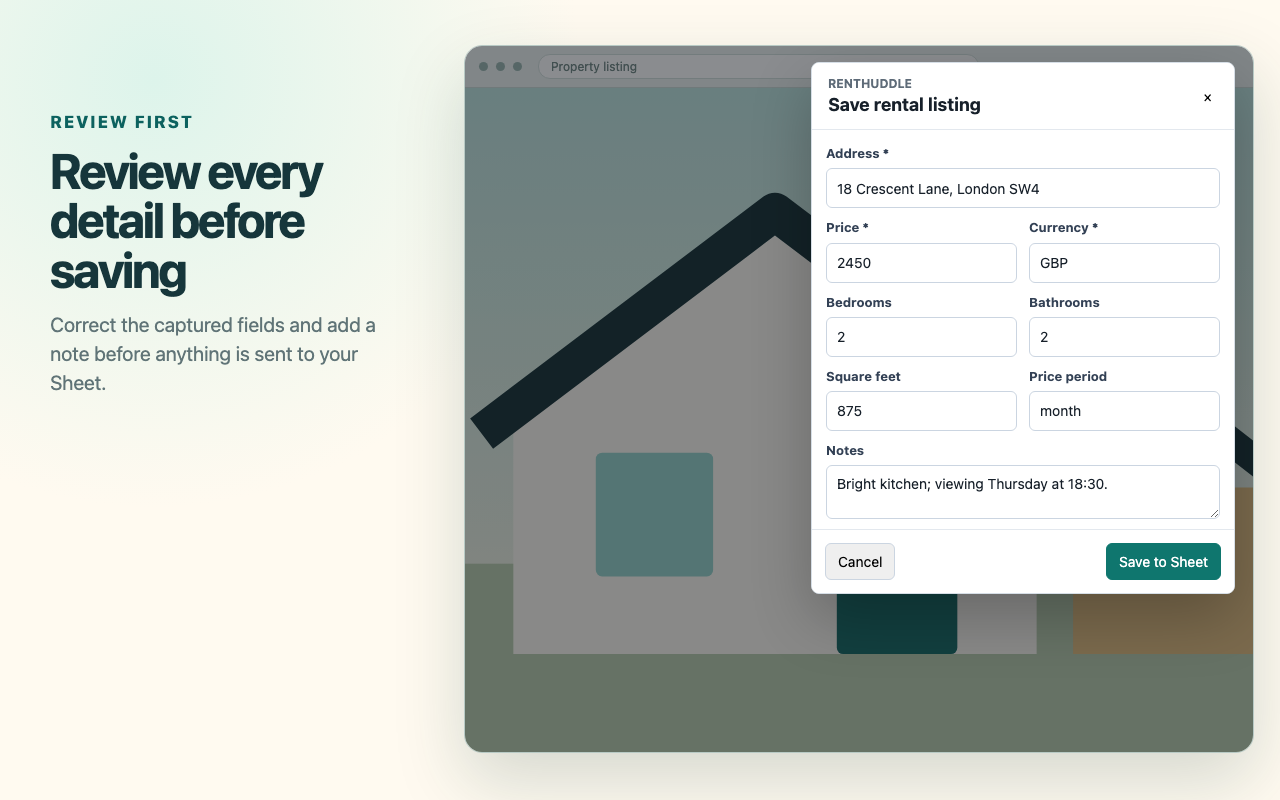
- Review the form shown over the listing page. Correct the address, price or other fields if the listing layout has made anything ambiguous.
- Add a status or note if useful, then choose Save to Sheet.
- Open the Shortlist tab to compare the new row with the rest of your search.
What information is captured
Supported Rightmove pages can provide the address, listing URL, rent or price, currency, bedrooms, bathrooms, property size, property type and listing image. The review form can also surface available rental details such as furnishing, availability, deposit, agent, EPC rating and council tax band when the page contains them.
The comparison Sheet is intentionally simpler. Its visible columns are photo, property, rent per month, beds, baths, size, type, status, rating, listing link and notes.
Why review matters
Property websites change and individual listings can omit facts or present them differently. RentHuddle leaves missing values blank and gives you the final check. Verify the rent period, bedroom count and any details important to your decision against the visible Rightmove page.
Where the data is stored
The data you approve is sent directly from the extension to the Google Sheets API over HTTPS and stored in the Google Sheet you selected. RentHuddle has no developer-operated backend. Google still processes the Sheet data under the terms for your Google account.
Privacy and limitations
- RentHuddle reads listing details when you choose Capture Property on a supported page.
- The extension uses Google’s
drive.filescope for Sheets it creates or that you explicitly select for RentHuddle. - It does not bypass sign-in, paywalls or unavailable listing information.
- Rightmove page changes may temporarily affect extraction, so review the form before every save.
How to install RentHuddle
- Open RentHuddle in the Chrome Web Store.
- Select Add to Chrome and confirm the extension permissions.
- Open the extension, read the privacy disclosure and create your RentHuddle Sheet.
- Visit a supported Rightmove property page and capture your first listing.